

How to create a W&B Experiment
Create a W&B Experiment in four steps:- Initialize a W&B Run
- Capture a dictionary of hyperparameters
- Log metrics inside your training loop
- Log an artifact to W&B
Initialize a W&B run
Usewandb.init() to create a W&B Run.
The following snippet creates a run in a W&B project named “cat-classification” with the description “My first experiment” to help identify this run. Tags “baseline” and “paper1” are included to remind us that this run is a baseline experiment intended for a future paper publication.
wandb.init() returns a Run object.
Note: Runs are added to pre-existing projects if that project already exists when you call
wandb.init(). For example, if you already have a project called “cat-classification”, that project will continue to exist and not be deleted. Instead, a new run is added to that project.Capture a dictionary of hyperparameters
Save a dictionary of hyperparameters such as learning rate or model type. The model settings you capture in config are useful later to organize and query your results.Log metrics inside your training loop
Callrun.log() to log metrics about each training step such as accuracy and loss.
Log an artifact to W&B
Optionally log a W&B Artifact. Artifacts make it easy to version datasets and models.Putting it all together
The full script with the preceding code snippets is found below:Next steps: Visualize your experiment
Use your project’s workspace to organize and visualize results from your machine learning models. You can construct interactive charts like parallel coordinates plots, parameter importance analyses, and additional chart types.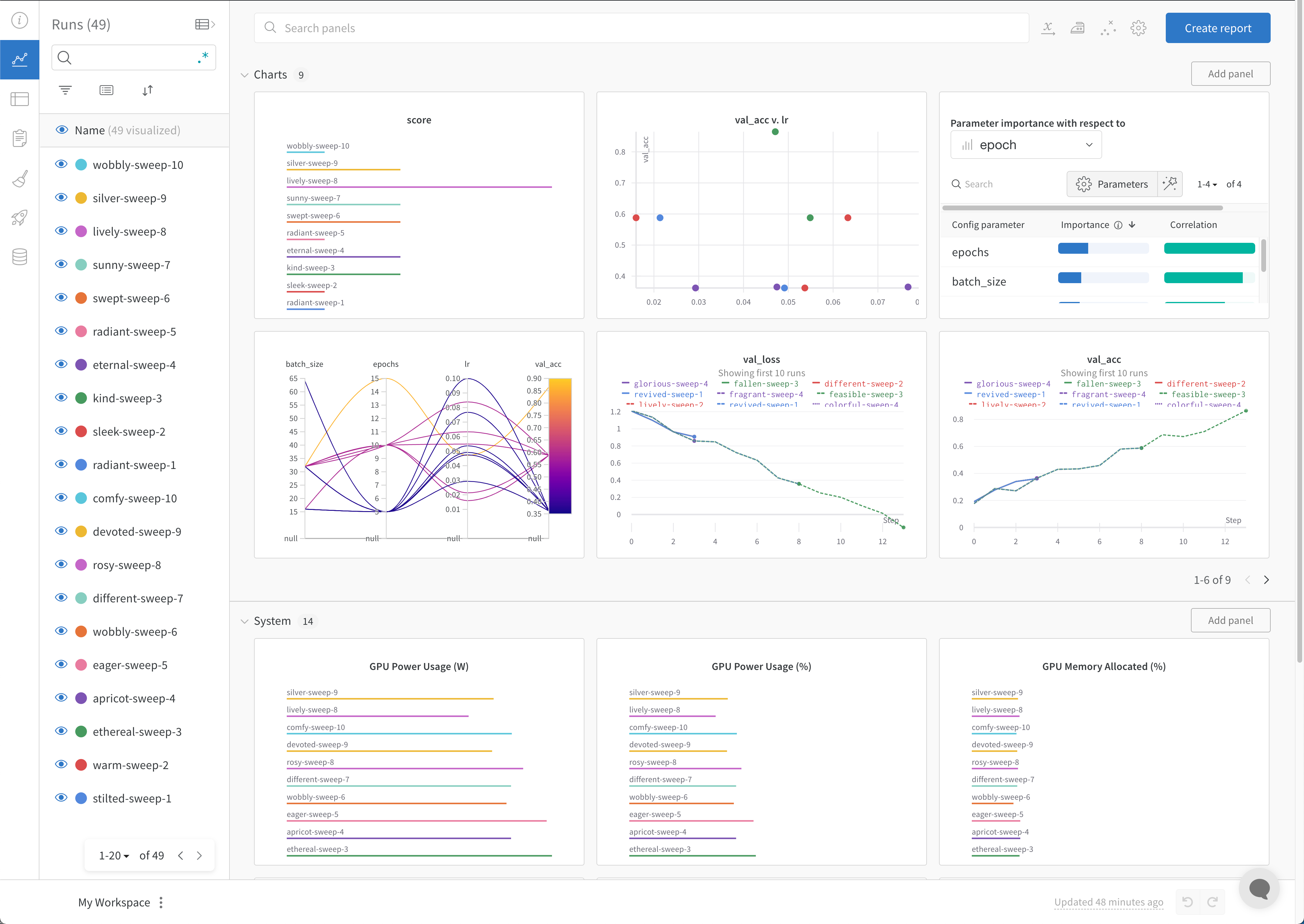
Best practices
The following are some suggested guidelines to consider when you create experiments:- Manage runs with a context manager: Use
wandb.init()in awithstatement to automatically finish the run when the code completes or raises an exception.-
In Jupyter notebooks, you might prefer to manage the run object yourself. In this case, call
finish()to mark it complete:
-
In Jupyter notebooks, you might prefer to manage the run object yourself. In this case, call
- Config: Track hyperparameters, model architecture, dataset information, and other values needed to reproduce your model. For more information, see View the config in the Overview section of a run in the W&B App.
- Project: Use projects to organize experiments in a central location where you can visualize results, compare runs, view and download artifacts, create automations, and more.
- Notes: Add notes to describe the purpose of a run, such as
baseline modelortuned hyperparameters. You can edit notes later from the run overview in the W&B App. - Job types: Add job types to your runs to organize and filter runs by task, such as
train,test, orinference. - Tags: Add tags to runs to label runs with features or attributes that might not be obvious from logged metrics or artifacts.
wandb.init() in the Python SDK Reference Guide.